DDScad 20
Update 20.2.0

Stability and safety for your design
Here you can find out everything you need to know about the update 20.2.0 for DDScad 20. This is a package for technical quality assurance; it minimizes the occurrence of undesirable effects in the software.
Please install the update to eliminate errors and maintain the safety of DDScad 20. At the same time, please remember to update all your DDScad workstations. This will help you to avoid compatibility problems due to different versions on your computers.
After installing the update, you will be using a more stable version of DDScad, as we have fixed some bugs. You can find an overview of the changes in our history.
How to install the update
Don’t know if you have already updated?
Just have a look! To do this, click on “About” in the “Help” menu.
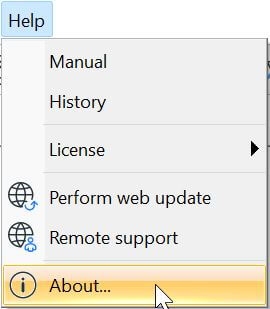
A window will then open. Here you will find information about the DDScad version you have installed. The first line shows the Version number.
If the version “20.2.0” is noted here, the update is already installed. If you find a different version number here, please update your installation by proceeding as described below.

To start the update
1st option:
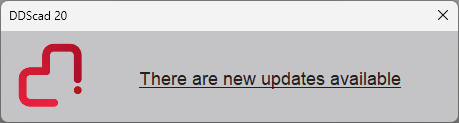
Immediately after starting DDScad, you will receive a pop-up window. Click on the link and then follow the instructions on your screen.
2nd option:
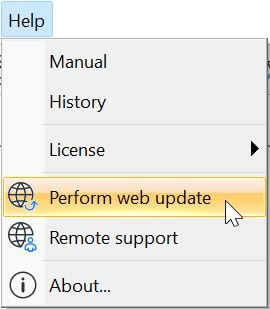
In the “Help” menu, click on the menu item “Perform web update”.
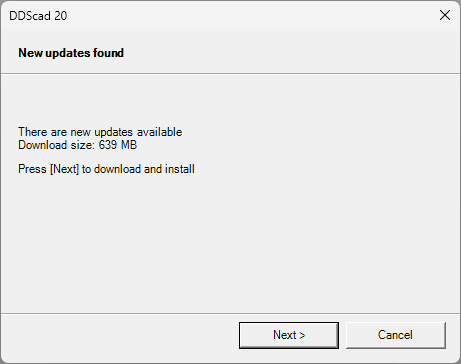
The following dialog will then open:
Click [Next] here and follow the instructions below.
If you have any questions, our technical support team will be happy to help you!
Contact
Do you still have open questions? Then just call us at +31 30 341 00 70 or send us an e-mail at [email protected]. We will be happy to support you.